

Hi, this is Darius, and welcome to my VSL Studio Review.
When I first heard about VSL Studio, I was tired of long video projects that took days and still felt flat. Writing a script, finding visuals, recording a voiceover, and editing everything together for one video sales letter felt like a full-time job.
So I started testing VSL Studio to see if it could really turn simple content like PDFs and webpages into full sales videos in a few minutes. After working with it on several offers, I can say it does a lot more than basic “content to video”.
It understands your offer, picks a proven sales framework, writes a script, adds a voiceover, and builds a full VSL almost on autopilot.
In this review, I will walk you through what it does, how it works, what I liked, what I didn’t, and who should actually get it.
What Is VSL Studio And Who Is It For?
VSL Studio is an AI-powered VSL creator that turns written content into full video sales letters. You can feed it:
- PDFs
- Webpage URLs
- Existing scripts
- Raw text or notes
The system reads your material and pulls out the main sales angles, pain points, and benefits. Then it builds a structured VSL using proven frameworks like PAS, AIDA, Star–Story–Solution, and SLAP.
Who I Think Will Get The Most Value
From my testing, VSL Studio makes the most sense for:
- Course creators who want quick promo videos for each offer
- Affiliate marketers who need fast promo VSLs for many products
- Agencies that want to sell “content to VSL” as a service
- Solo creators who hate editing but still want strong sales videos
If you work with long-form content and want a fast way to turn it into sales videos, this tool fits that need well.
First Impressions: Purpose And Key Features
When I logged in the first time, the main goal felt very clear: speed and structure. The app tries to remove all heavy tasks around VSL creation:
- No manual script writing
- No voiceover recording
- No timeline editing
- No hunting for stock footage
You give it input, choose a style, and let the system build the VSL. From my runs, a first version of a VSL came out in a few minutes, even for longer content.
Other reviews online point out the same thing: it focuses on conversion structure, not just visuals.
The key things that stood out for me were:
- Automatic framework choice (PAS, AIDA, Star–Story–Solution, SLAP)
- Script + voiceover + visuals handled in one place
- 12+ video styles (cinematic, character animation, whiteboard, comic, and more)
- Multilingual generation for different markets
- Scene mode for manual tweaks when you want more control
So from the start, it felt like a “conversion-first” video system, not just a slideshow maker.
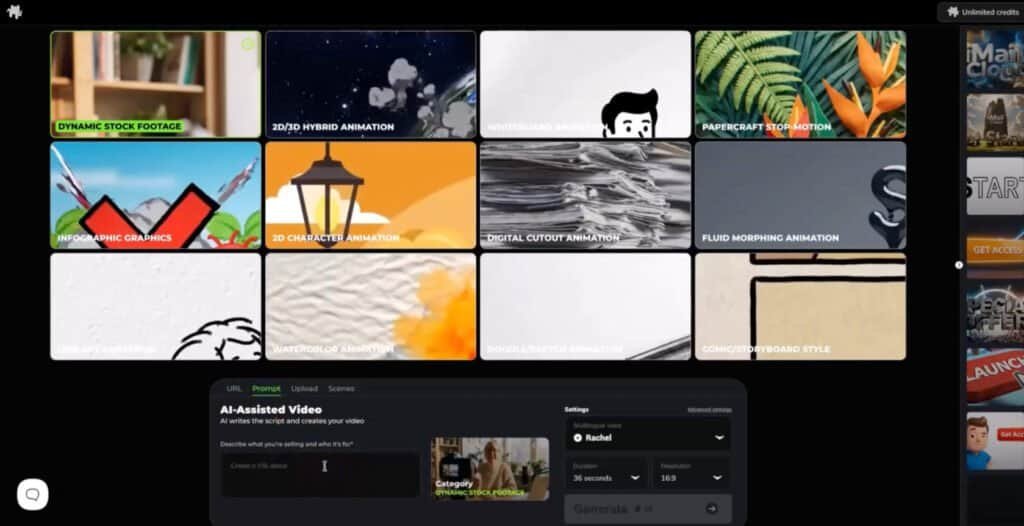
Simple Dashboard And Workflow
The interface is clean and not overloaded with options. You pick what you want to create, then follow a straight path:
- Choose a video style
- Paste a URL, upload a file, or paste text
- Set voice and length
- Click create and wait for the render
There is no heavy timeline or complex menus. If you have used any online video app, you will understand it fast. Other reviewers also note that there is no need for advanced editing skills, which matches my experience.
Credit System And Plans
VSL Studio uses a credit system. Each plan gives you a set number of credits per month to create videos:
- Starter: around 1,000 credits for up to 10 standard VSLs or more shorter clips
- Upgrades let you increase video length, add more styles, and unlock scene control and extra credits
For most solo creators and small affiliates, the Starter plan gives enough volume to test many offers. Agencies and heavy users will want the Business or Credit Booster upgrades.
Video Output Quality
The videos look clean and professional. Scenes line up with the script, and the pacing feels natural. You can choose from several styles like:
- Character animation
- Cinematic footage
- Whiteboard
- Infographic
- Comic style
- Watercolor and papercraft looks
I did not see awkward cuts or strange timing in my tests. You can still adjust scenes in PRO mode if you want something more exact.
VSL Studio Review: Demo Video
VSL Studio Pricing And Funnel
When I looked at VSL Studio, I wanted to know one thing first: what do I get at each price point, and is it enough for my workflow? Here is how the full pricing and funnel breaks down in simple terms.
VSL Studio Starter (Front End) – $47 One-Time
The Starter plan is the main version of VSL Studio and it gives you everything you need to test the platform and create short video sales letters.
You get:
- 1,000 credits per month
- Around 10 videos at 70 seconds or 20 videos at 35 seconds
- Up to 70 seconds per video
- 6 core video styles:
- Dynamic stock footage
- 2D/3D hybrid animation
- Whiteboard animation
- Papercraft stop motion
- Infographic graphics
- 2D character animation
- 720p video output
- URL, prompt, and file upload modes
From my point of view, Starter is great if you:
- Are new to VSLs
- Want to see how the AI handles your content
- Need short promo videos, bump offers, or simple product pitches
There is also an order bump at checkout: for $97, you can unlock 2,000 credits per month plus 6 extra VSL styles. There is no active coupon mentioned for the main offer, so I treat $47 as the baseline price.
VSL Studio Pro (Upsell 1) – $67 One-Time
Once I saw what Starter can do, Pro felt like the “creative control” upgrade.
With VSL Studio Pro you get:
- Unlimited AI generations (no credit limits)
- Multilingual video creation
- Scene Mode for manual scene editing and customization
- Voice cloning (you can use your own voice)
- More freedom for agencies and heavy users
Pro is the plan that makes sense if you want to:
- Produce many VSLs each month
- Sell VSLs as a service
- Create videos in multiple languages
- Use your personal voice for brand trust
If you run an agency or manage many offers, unlimited generations alone can justify this upsell.
VSL Studio Business (Upsell 2) – $97 One-Time
Business is all about power and speed. This is where you upgrade video quality and length.
You get:
- 1080p Full HD video output
- Extended video length up to 105 seconds
- Priority rendering queue
- Faster delivery for big batches of VSLs
I see this as the “production floor” upgrade. It fits:
- Agencies with many client projects
- Marketers who want cleaner HD output
- Campaigns where you need longer VSLs with more detail
If you hate waiting for renders or you handle launches with many video assets, Business will make things smoother.
VSL Studio Booster + Styles (Upsell 3) – $127 One-Time
The Booster + Styles upgrade is for users who need more volume and more looks for their videos.
You get:
- 2,000 extra credits every month
- Around 20 videos per month at 70 seconds
- Or about 40 videos at 35 seconds
- 6 extra premium styles:
- Digital cutout animation
- Fluid morphing animation
- Line-art animation
- Watercolor animation
- Doodle/sketch animation
- Comic storyboard style
- Regularly added professional VSL templates
- Faster creation of ready-made video styles
This one makes sense if you:
- Run many offers and need ongoing video output
- Want more unique looks for each client or brand
- Prefer plug-and-play templates that you can adjust fast
For me, this upgrade is less about “can I use the tool” and more about “can I scale this as a service”.
VSL Studio Bundle – $167 One-Time (Best Value Option)
If you already know you want the full system, the Bundle is the best deal. It includes:
- VSL Studio Starter (Front End) – currently $47
- VSL Studio Pro (Upsell 1) – currently $67
- VSL Studio Business (Upsell 2) – currently $97
- VSL Studio VSL Styles Only (part of Upsell 3) – currently $127
- All bonuses
- Tutorials and knowledge base
There is also an annual order bump at $167 per year that gives you 5,000 credits per month. That is aimed at heavy users who want a large, steady credit pool for ongoing work.
From my viewpoint, the Bundle makes sense if:
- You are serious about using VSL Studio as a core tool
- You run an agency or multiple brands
- You want all main features and styles from day one without piecing together upgrades later
If you are still unsure, starting with the $47 Starter plan is safe. If you already have clients or products waiting for VSLs, the $167 Bundle gives you the best long-term value.
My Exclusive VSL Studio Bonus Stack – Turn VSLs Into Traffic, Leads, And Sales 🎁
When you grab VSL Studio through my link, you also get a bonus stack built to support what VSL Studio does best: turn your content into sales videos.
These extras help you pick better markets, send traffic to your VSLs, and turn viewers into buyers and long-term clients.
GPT Store Exposed – Turn VSL Viewers Into Buyers 🛒
VSL Studio helps you present your offer. GPT Store Exposed helps you turn simple ideas into real products that sell.
Inside this guide you learn:
- How to turn small tools, checklists, and offers into products
- How to present them so people see clear value
- Simple flows that move viewers from “watching your VSL” to “buying the upgrade”
Record your VSL with VSL Studio, then plug this system in on the back end and turn your new attention into sales.
$102,016.16 in 27 Days Case Study – Plug VSL Studio Into A Proven Funnel 📈
This case study breaks down how “Anonymous AI” pulled in $102,016.16 in 27 days.
You see:
- The funnel layout
- The traffic angles
- The follow-up structure
You can use VSL Studio as the core sales asset inside a similar funnel. Your VSL becomes the main pitch. Then you send traffic and leads into a model that already worked, instead of testing from zero.
AInfluencer – Use AI Influencers To Push Your VSL Studio Offers 🤖
If you do not want to show your face on camera but still want reach, AInfluencer fits well with VSL Studio.
You will see how to:
- Build AI-based “influencer” profiles
- Post content that feels real and niche-focused
- Use these profiles to send traffic to your VSL Studio videos
Your AI influencer points people to your sales pages and VSLs. VSL Studio does the selling while you stay in the background.
Recurring AI – Turn VSL Leads Into Monthly Income 💵
VSL Studio helps you get people to say “yes” to your offers. Recurring AI shows you how to turn those buyers and leads into monthly payments.
Inside you learn:
- How to set up simple recurring offers
- How to price them so they are easy to join
- How to structure the content so people stay subscribed
Send your VSL traffic into these low-ticket recurring offers and let the monthly income stack up over time.
AI Agents Exposed – Let AI Handle The Busy Work Around Your VSLs ⚙️
Once your VSLs are live, you still need eyeballs on them. AI Agents Exposed shows you how to set up AI “agents” to handle the boring parts.
You will learn how to use AI to:
- Post and repost content that links to your VSLs
- Turn one VSL into many small content pieces
- Keep your offers active without you sitting at the computer all day
VSL Studio builds the sales videos. AI agents keep traffic and content flowing around them.
Instant Cash Dash – Quick Cash While Your VSLs Warm Up 💸
VSL Studio is great for long-term offers and funnels. But you may want quick cash too. Instant Cash Dash gives you simple methods to bring in daily payments while your bigger VSL campaigns ramp up.
You learn:
- Easy offers you can set up in a day
- Simple promo pages you can link to under your VSLs
- Ways to test ideas fast without complex tech
Use your VSL Studio audience and email list as the first traffic source for these quick-win offers.
Skooolify – Turn VSL Leads Into Recurring Skool Commissions 🎓
Skooolify shows you how to earn recurring commissions from Skool communities and courses.
You can:
- Use your VSL Studio videos to promote a free guide or mini class
- Send those leads into Skool groups that pay you recurring commissions
- Turn each VSL into a long-term commission stream
Your VSL brings people in. Skool and this system turn that attention into ongoing income.
Slide Cash Loophole – Use Simple Slides To Feed Your VSLs 📊
Slide Cash Loophole shows you how to use simple slide decks to get traffic from platforms that love slide content.
You can:
- Turn your VSL scripts into slide decks
- Upload them to slide and document sites
- Link back to your VSL Studio videos or opt-in pages
Over time, those slides send a steady stream of free visitors to your offers.
Secret Platform Digital Product System – Sell To Buyers You Don’t Control Yet 💰
This bonus shows you how to sell digital products on a lesser-known platform that already has buyers searching for offers.
You learn:
- How to list and present your products there
- How to stand out among other sellers
- How to bring those buyers back to your VSLs and your own list
Use VSL Studio to create sales videos for your digital products, post them where these buyers hang out, and then pull them into your own funnel. This way you grow your customer base on and off the platform at the same time.
Delivered instantly to your JVZoo account after purchase.
How VSL Studio Credits Work
Here is the short version of how credits work in VSL Studio.
On the Starter plan, you get 1,000 credits each month. That gives you about:
- 10 videos at around 70 seconds, or
- 20 videos at around 35 seconds
Longer videos use more credits, shorter ones use fewer. Credits reset each month, so I treat them like a monthly video budget.
If you add the Booster + Styles upgrade, you get 2,000 extra credits every month. That lets you make about:
- 20 more videos at 70 seconds, or
- 40 more videos at 35 seconds
There is also a yearly bump option with 5,000 credits per month for heavy users and agencies.
With VSL Studio Pro, you get unlimited AI generations, so you do not need to count credits for each new version or script test. That plan makes sense if you create a lot of VSLs or run many split tests.
About The Vendor And VSL Studio Launch Dates
When I look at any new software, I always check who is behind it. VSL Studio comes from Todd Gross, a well-known name in the video marketing space.
He has been involved in many video tools over the years, so this is not a random one-off project. That gives me more trust that VSL Studio will be supported and updated, not just launched and forgotten.
VSL Studio Launch Window And Price Increase
The VSL Studio launch starts on December 8 at 11:00 AM EST and runs until December 12 at midnight. During this window, you get access at a special launch price.
After December 12, the price is set to go up. So if you already know you want to use VSL Studio for your funnels, clients, or agency work, this launch period is the best time to lock in the lower cost.
I see it as a good chance to test the tool on a few offers while the price is still low, then decide if you want to upgrade to the higher plans later.
Key Features And How They Help You Sell More
AI Content Analysis And Script Creation
You can upload a PDF, enter a URL, or paste in text. VSL Studio reads the content and pulls out:
- Main pain points
- Big benefits
- Claims and proof points
- Core promise of the offer
From there, it creates a sales script that feels natural and focused. For me, this was a huge time saver. Instead of staring at a blank page, I got a script draft that I could polish in a few minutes.
Benefit: You spend more time improving your message and less time starting from zero.
Built-In PAS, AIDA, Star–Story–Solution, And SLAP
This is one of the strongest features. VSL Studio does not just read content and throw random lines on the screen. It applies proven frameworks:
- PAS: Problem → Agitate → Solve
- AIDA: Attention → Interest → Desire → Action
- Star–Story–Solution: Character driven, strong for “before/after” offers
- SLAP: Stop → Look → Act → Purchase
The system analyzes your content and picks the framework that fits your offer. For example, a pain-heavy offer might use PAS, while a “flash sale” style promo may use SLAP.
Benefit: Your videos follow a clear, tested flow that keeps viewers engaged and leads to a direct call to action without you needing deep copywriting skills.
Script, Voiceover, Visuals, And Animations In One Place
Once the script is ready, VSL Studio:
- Generates a full AI voiceover
- Matches scenes and visuals to each part of the script
- Adds transitions, effects, and light motion graphics
- Syncs voice, text, and visuals
With the PRO upgrade, you can even clone your own voice for a more personal touch.
Benefit: No need to hire a voice actor or edit audio. You can send a finished VSL to a client or upload it to your funnel in the same day.
12+ Premium Video Styles For Branding
You can pick from more than a dozen styles:
- Cinematic footage
- Character animation
- Whiteboard
- Infographic
- Papercraft
- Comic style
- Watercolor
- Morphing animation, and more
This helps you match the style with your niche. A SaaS offer may fit a clean infographic look, while a story-driven health offer may work better with character scenes.
Benefit: Your videos feel aligned with your brand and audience instead of generic stock slides.
Multilingual Generation
VSL Studio can create VSLs in multiple languages. The system adjusts tone, pacing, and voice to match the selected language.
Benefit: You can tap into new markets without hiring translators or separate voice talent. For agencies, this means you can sell the same VSL in several languages.
Scene Mode For Extra Control (PRO)
With the PRO level, you can open each scene and change:
- Text
- Visuals
- Timing
- Voice style
You still get the speed of AI creation, but you can fine tune parts that matter more, such as the hook and final call to action.
Benefit: Great for clients who want custom details or for split tests where a small script change can lift conversions.
Fast Rendering And Variations
You can clone a project and create new versions fast. Change the hook, adjust the call to action, test a new voice, or try a different style. Rendering time is short, and Business users get priority.
Benefit: Perfect for A/B testing and campaigns where you want to test different angles without redoing all the work.
How VSL Studio Compares With Other Tools
VSL Studio vs Simple Slideshow Video Apps
Most cheap video tools take text, pair it with stock footage, and add a voice track. They do not think about sales flow.
VSL Studio stands out because it:
- Reads and understands your offer
- Applies proven VSL frameworks
- Structures each video as a clear sales argument, not just a slide show
So while other tools help you “have a video”, this one helps you sell with that video.
VSL Studio vs Hiring Freelancers
If you hire a copywriter, voice actor, and editor, you might pay hundreds of dollars for one VSL and wait days or weeks.
With VSL Studio:
- You pay a fixed fee for the software
- You create as many VSLs as your credits allow
- You keep full control over revisions
For high-ticket offers, you might still want a top copywriter. But for standard funnels, affiliate promos, and quick tests, VSL Studio offers strong value.
Pros And Cons Of VSL Studio
Pros
- Turns PDFs, web pages, and text into full VSLs in minutes
- Uses PAS, AIDA, Star–Story–Solution, and SLAP for strong structure
- Script, voiceover, and visuals created in one flow
- 12+ video styles for different niches and brands
- Multilingual support for global reach
- Scene mode for manual control with PRO
- Credit system allows clear planning of monthly volume
- Strong fit for agencies and freelancers who sell video services
Cons
- Credit system may feel limiting for heavy daily use
- Voice quality is strong, but still AI; some people will prefer a real voice actor
- Scene mode and some extra styles sit behind upgrades
- Not suited for complex long-form webinar videos yet (standard lengths are shorter, unless you move to higher tiers)
Real User Feedback: What Other Marketers Say
While testing VSL Studio, I also checked several online reviews and demos to see how other marketers felt about it.
Across review blogs and YouTube walkthroughs, common positive points include:
- People like that it focuses on conversion frameworks, not just looks
- Many mention that they do not need to touch a timeline at all
- Agencies appreciate commercial rights and use it to sell VSLs as a service
- Affiliate marketers like the speed for launch promos and bonus pages
On the downside, a few reviewers point out:
- Longer videos need higher tiers and more credits
- Some users feel AI voices still need light tweaking to sound more natural
- Power editors who want frame-level control may feel limited
Overall sentiment from the reviews I saw is positive, especially from users who want fast, structured sales videos without hiring a full team.
Tips And Tricks To Get The Most From VSL Studio
After playing with VSL Studio for a while, here are some tips that gave me better results.
Start With Clean Source Content
The better your starting content, the better your VSL. Before upload:
- Remove fluff
- Make sure your offer, price, and main benefits are clear
- Add any key proof points you want the video to highlight
This helps the AI pull out the right angles.
Choose The Style That Matches Your Audience
Do not just pick a random style. Think about who you want to reach:
- B2B or SaaS: infographic or clean motion graphics
- Local business: character animation or cinematic footage
- Story-driven offers: comic, watercolor, or character scenes
Match the style with your brand and message for higher trust.
Use PRO Scene Mode For Hooks And CTAs
Even if you let the AI handle most of the script, open scene mode and pay extra attention to:
- First 10–15 seconds (hook)
- Final call to action
Make sure the hook speaks to a clear pain or desire. Make the call to action direct and simple.
Clone Your Voice For Personal Brands
If you are the face of your brand, voice cloning in PRO makes a big difference. The video still renders fast, but it sounds like you, which helps trust and clicks.
Create Variations For Split Tests
Clone your main VSL and create versions that change:
- Hook
- Guarantee section
- Price reveal
Use them for A/B tests on your sales page or ad campaigns. Small script shifts can give strong gains.
FAQ: Common Questions About VSL Studio
Is VSL Studio good for beginners?
Yes. You do not need editing skills or copywriting experience to start. You upload content, pick a style, set some options, and the system handles the rest.
How long does it take to make a VSL?
From upload to final render, my projects took a few minutes each, depending on length and style. The actual “setup” work took me only a few minutes per video.
What content formats can I use?
You can use:
- PDFs
- DOC files
- Webpage links
- Raw text and scripts
Can I edit the script?
Yes. You can review and edit the script, and with PRO you can tweak each scene, line, and visual.
Does it work in other languages?
Yes. VSL Studio supports multiple languages and adjusts voice and pacing for each one.
Can I sell the videos I make?
Yes. Plans include commercial rights, so you can sell VSLs to clients, add them to your agency packages, or create “content to video” services.
What are the main upgrades?
Common upgrades include:
- PRO: more control, extra languages, voice cloning
- Business: longer videos and priority rendering
- Credit Booster + Templates: more credits and extra styles/templates
Final Verdict: Who Should Buy VSL Studio?
After using VSL Studio on several offers, I see it as a strong tool for marketers who care about speed and conversion structure more than frame-perfect editing.
I recommend VSL Studio if you are:
- A course creator or coach who needs sales videos for each offer
- An affiliate who wants promo videos for many products each month
- An agency owner who wants to sell VSLs, “content to video”, or multilingual video packages
- A solo creator who hates editing but still wants clean, persuasive videos
You may want to skip it if you:
- Need very long webinar-style videos right now
- Want Hollywood-level custom editing and effects
- Refuse to use AI voices at all
For most online marketers, especially those who work with written content, VSL Studio can save a lot of time and unlock new service offers.
You turn static pages, PDFs, and scripts into structured video sales letters that follow proven frameworks and are ready to plug into your funnels and campaigns.
If you want faster VSL production and a more consistent sales message across your offers, this tool deserves a serious look.